From Inbox to Record: Handling Documents That Arrive as Emails, PDFs and Scans
In every medium-to-large business, there is a constant, messy influx of paperwork.
Documents arrive through every imaginable channel. A logistics supplier emails a multi-page PDF invoice. A driver in the field uploads a smartphone photo of a fuel receipt and a paper delivery docket. A commercial landlord sends a scanned TIFF lease agreement with handwritten margin notes. A customer places an order via a plain text email containing an embedded rate table.
None of this information arrives in a clean database format. Yet every single document must eventually become a structured record inside an enterprise resource planning (ERP) system, accounting ledger, or customer database.
Today, most companies bridge this gap using expensive human labor. Administrative staff, accounting clerks, and operations coordinators sit in front of dual monitors, spending hours copying names, tax identifiers, dates, line items, and bank details from visual documents into software input screens.
This manual transcription process is slow, expensive, and fragile. It turns qualified employees into data-entry conduits and introduces inevitable human keystroke errors that take weeks to untangle.
The Operational Cost of Manual Document Ingestion
Treating manual document transcription as an unavoidable cost of doing business creates structural drag across the entire organization:
First, administrative capacity is consumed by routine translation. When operators spend half their working day retyping numbers from email attachments into enterprise software, they have no time left to investigate billing variances, negotiate supplier terms, or service customers. Adding more business volume requires linearly hiring more administrative personnel.
Second, transaction velocity stalls. A supplier bill or freight delivery docket that sits in a shared inbox for four days waiting to be opened, read, and entered delays downstream operations. Inventory remains un-received in the warehouse management system, customer billing cannot be finalized, and early payment discounts lapse.
Third, data quality decays at the perimeter. Typing twenty-digit bank IBANs, multi-segment purchase order numbers, and intricate line-item part codes by hand guarantees a baseline rate of typographical errors. An incorrect digit in a tax number triggers an audit rejection; a transposed SKU sends the wrong replacement part to a client site.
The challenge is not that businesses lack enterprise software. The problem is that enterprise software demands perfectly structured database records, while the real commercial world communicates through messy, unstructured visual documents.
Why Traditional Optical Character Recognition (OCR) Failed
Many enterprises attempted to solve this problem years ago using first-generation OCR software. Most abandoned or scaled back those initiatives because the technology broke down under real-world conditions.
Traditional OCR relied on rigid coordinate templates. A developer had to configure an exact layout for every vendor: specifying that Vendor A placed their invoice number at coordinates X:120, Y:340, while Vendor B placed it at X:450, Y:110.
This approach failed for predictable reasons:
- Layout Volatility: If a supplier updated their invoice design, altered their margin spacing, or added a promotional banner, the template broke. The system extracted blank fields or grabbed the wrong numbers.
- Visual Artifacts: When documents arrived as skewed scans, faded faxes, or photos taken under warehouse lighting, template-based systems could not read the text.
- Unstructured Variations: An email where the payment terms are described across three conversational paragraphs cannot be mapped to a static rectangular bounding box.
As a result, traditional template software created more maintenance overhead than it saved. Engineering teams spent hundreds of hours adjusting coordinate boxes whenever a supplier changed their stationery.
The Architecture of Intelligent Document Processing
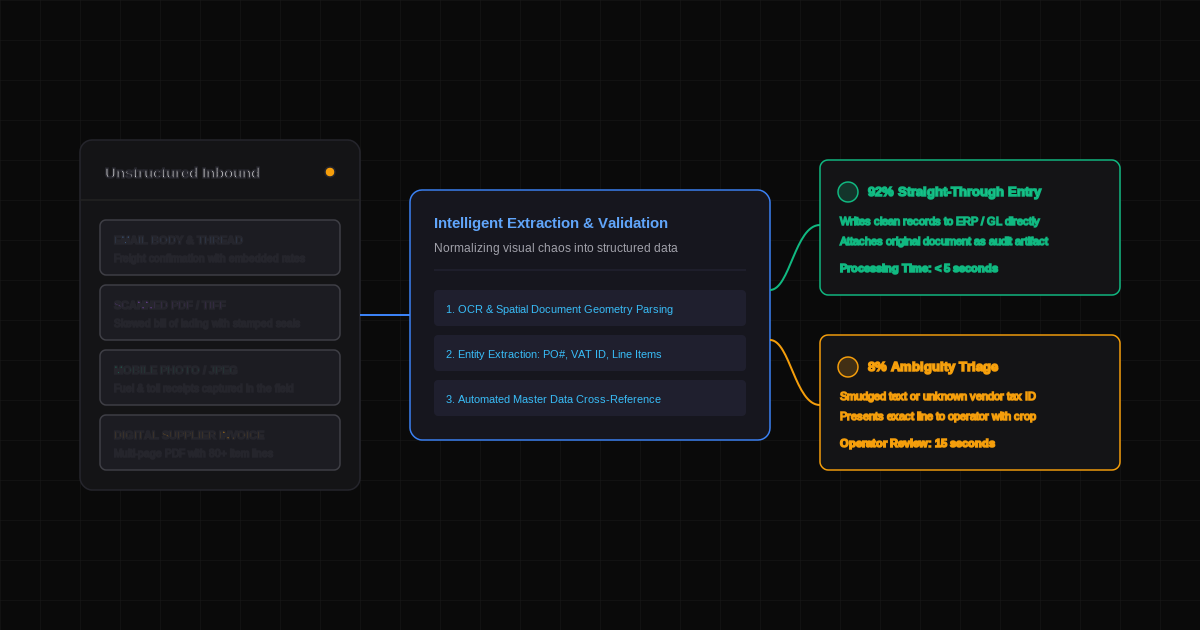
Modern document processing automation does not rely on rigid visual coordinates. Instead, it combines spatial geometric analysis, optical recognition, and semantic contextual understanding to read documents the way an experienced human operator does.
The workflow moves through four distinct operational stages:
[Inbound Stream] (Emails, PDFs, Scans, Camera Photos)
        ↓
[Document Geometry & OCR Engine] (Normalizes skew, parses tables)
        ↓
[Contextual Entity Extraction] (Pulls PO#, VAT ID, line items, banking)
        ↓
[Programmatic Master Data Validation] (Matches against ERP vendor catalog)
        ↓
[Straight-Through Entry] (90%+ into ERP) OR [Targeted Exception Review] (<10%)
Stage 1: Ingestion and Document Normalization
The system monitors designated corporate touchpoints: accounts payable inboxes, SFTP drop folders, webhook endpoints, and field-worker mobile uploads.
When a file arrives, the ingestion engine immediately analyzes its format. If it is an email with multiple attachments, it unpacks each file individually. If it is a scanned PDF or smartphone photograph, the system applies image-cleansing filters: deskewing tilted pages, adjusting contrast on low-light scans, and removing digital noise.
Stage 2: Spatial Layout and Entity Extraction
Rather than looking at static coordinates, the contextual extraction engine evaluates the semantic meaning of the document.
It understands that a sequence of characters labeled "Tax No.", "VAT Reg", "MwSt.", or "USt-IdNr." all represent the same core business entity. It analyzes spatial relationships: identifying that a table consists of columns for description, quantity, unit price, and total, even if the table lacks visible gridlines.
The engine extracts critical transaction attributes:
- Counterparty identity (corporate name, address, tax registration)
- Transaction identifiers (invoice number, purchase order reference, dispatch note)
- Financial values (net total, tax breakdown, freight surcharges, gross currency amount)
- Banking coordinates (IBAN, SWIFT/BIC, bank routing numbers)
- Line-item details (SKUs, quantities, units of measure, itemized descriptions)
Stage 3: Triangulation Against Master Data
Extracting text from a page is meaningless if the data cannot be reconciled against the business's existing operational records.
Before anything is committed to a ledger, the system runs programmatic validation checks against internal databases:
- Does the extracted supplier tax number match an approved vendor record in the ERP?
- Does the cited purchase order exist, and does it have remaining unbilled balance?
- Do the itemized line items sum up mathematically to the stated gross invoice total?
- Do the listed bank remittance details match the verified bank account on file for this counterparty?
If all data points align mathematically and verify against master enterprise records, the transaction qualifies for straight-through processing.
Stage 4: Straight-Through Entry vs. Exception Triage
In a mature implementation, over ninety percent of incoming documents flow directly into enterprise systems without human intervention. The invoice is created, the lines are matched to the purchase order, and the original PDF is attached as a permanent audit artifact.
However, the defining strength of an operational system is how it handles the remaining eight to ten percent of ambiguous documents.
Instead of failing silently or throwing a vague error, the system creates a targeted exception task for a human operator. It displays the original document side-by-side with the specific field in question—for instance, highlighting an illegible handwritten delivery quantity. The human reviewer verifies or corrects the single field in ten seconds, clicks approve, and the record continues on its automated path.
The human operator acts as a supervisor and decision-maker, not a manual data-entry typist.
The Tangible Business Outcomes
When an enterprise automates document processing from the point of inbox arrival, the commercial benefits materialize immediately:
- Processing Cycle Time Collapses: Documents that previously sat in queues for days are extracted, validated, and entered into financial ledgers within seconds of receipt.
- Labor Overhead Decreases: Organizations handle seasonal doubling or tripling of document volumes during peak periods without hiring temporary administrative workers or paying overtime.
- Downstream Disputes Disappear: Because line items, tax rates, and purchase order references are verified against master catalogs prior to entry, billing disputes and misallocated expenses drop to near zero.
- Complete Audit Trail: Every transaction retains an immutable link to its source file, complete with timestamped extraction confidence scores and logs of any human operator modifications.
How Kalvron Solves Document Intake
At Kalvron, we engineer custom document processing workflows that run directly inside the systems your business already uses.
We do not provide generic, self-serve software that leaves your IT team to configure complex extraction rules. We design, deploy, and operate the entire ingestion layer. We connect your incoming email channels, scan repositories, and mobile inputs directly to your ERP, accounting software, and operational databases.
We build the validation rules that reflect your specific commercial tolerances, train extraction models on your proprietary industry documents, and ensure strict compliance with regional data sovereignty standards across Europe, Singapore, Malaysia, and the Gulf.
Stop forcing your talented staff to spend their days copying numbers from PDFs into spreadsheets. By turning incoming visual documents into structured enterprise records automatically, you protect your operational margins, eliminate costly transcription errors, and give your team their working hours back.
Find out what your business can stop doing by hand.
In 20 minutes, we map your workflow and show you where an AI OS fits. No pitch. Just the diagnosis.
Book a call